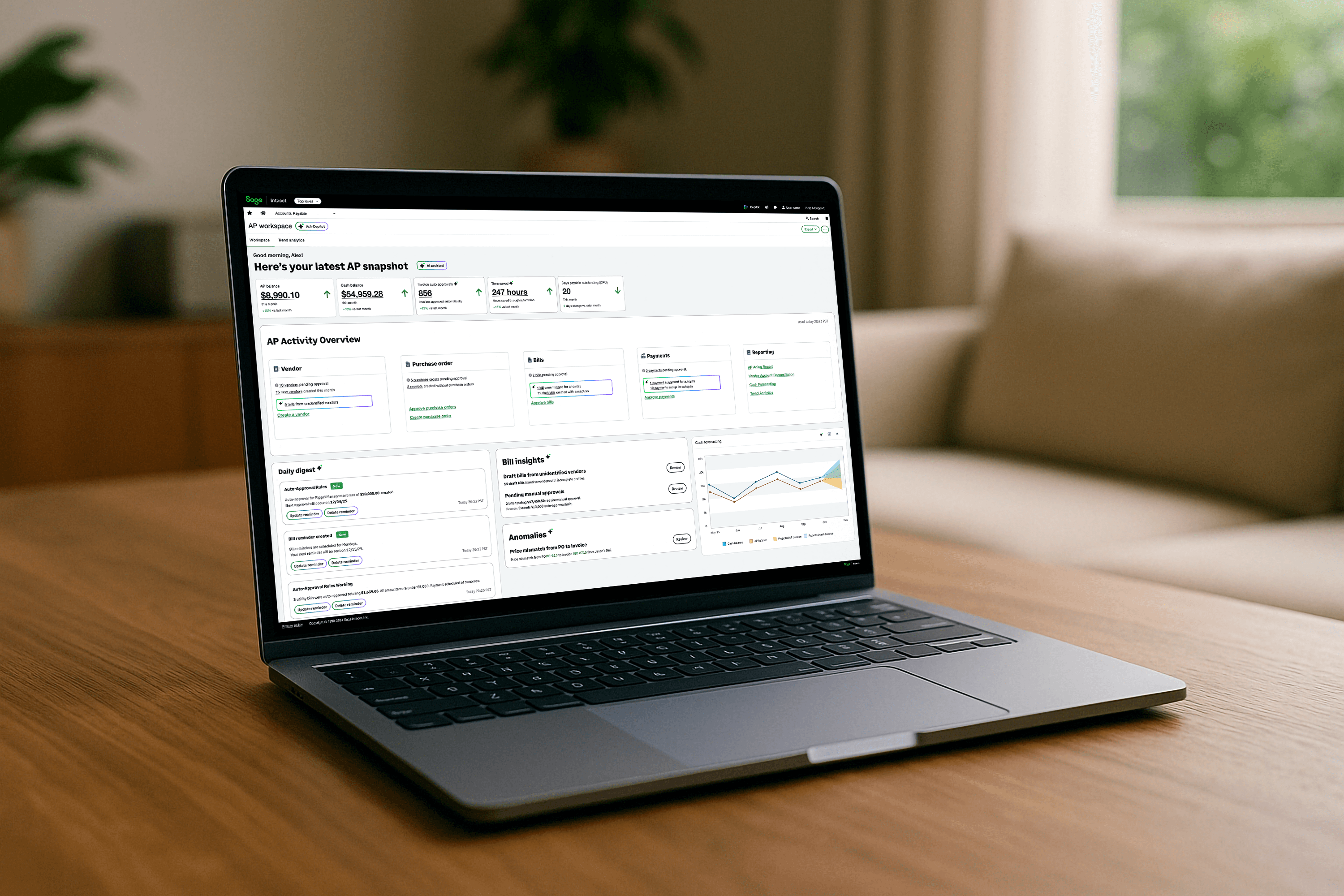
What finance leaders were missing
In interviews, AP Managers, Controllers and CFOs kept telling us the same thing: they didn't need more numbers. They needed to know what they were missing and what they had to do to stay on top of month-end close.
The existing Intacct dashboard couldn't tell them either. It was pure metrics: static widgets for monitoring, not designed around anyone's role. And Intacct had no notification center, so the product couldn't proactively tell someone that something needed action.
Mapping how AP really works. With Product, I facilitated a process-mapping session across the full AP lifecycle: bill entry, vendor approvals, payment, reporting, reconciliation, and 1099 season. We mapped who does what, from AP Clerks to the CFO, and where work stalls: back-and-forth department approvals, bills pulled from check runs for missing details, and errors found only at reconciliation or tax time.
Framing where AI could help. With the design team, I reframed the question as "How can AI help with these pain points?" We agreed on the outcomes customers care about (maintain cash flow, see the whole process, do less manual work) and marked where AI could surface the unexpected: missing bills, unusual prices, duplicates, and outliers. We set one rule early: keep the accountant in the loop.
The spark and the stakes. Around the same time, our VP of UX shared Nathan Rosidi's The Death of Dashboards. It sharpened the question I was already asking: if dashboards are good at showing information, what experience do we need when intelligence can understand what actually needs attention? The stakes were competitive too. AI-native accounting platforms like Rillet were resetting what finance teams expect, and an adaptive workspace gave Intacct a way to bring intelligence into the product people already trust.

From monitoring to attention
Two jobs. The workspace did two things:
Fix the foundation. It closed gaps in the current experience: a metrics-only dashboard and no way to notify people when something needed action.
Add intelligence. AI could prioritize, explain why something mattered, and help people act.
Traditional dashboard: Show me what I'm monitoring.

Intelligent Workspace: Show me what needs my attention.
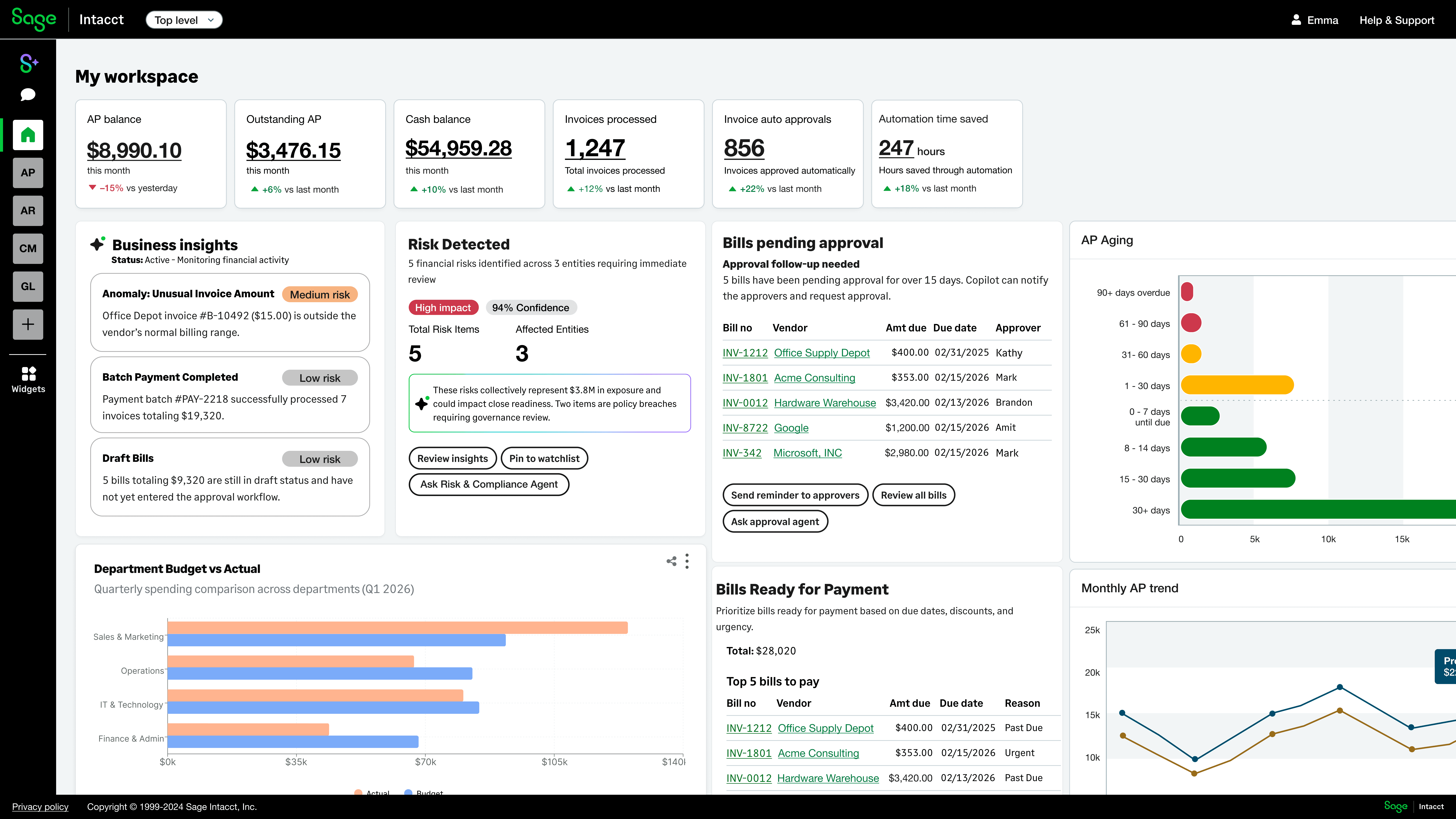
I called it a workspace on purpose. "Dashboard" suggested something passive. The new name helped the team describe a different interaction model.
One model: Understand → Prioritize → Notify → Act.
Role-aware by design.
AP Manager: bills waiting for approval, where they're stuck, upcoming payment risks and anomalies, and how work is spread across the team.
Controller: cash position, financial risk, anomalies, and close readiness.
Finance leader: where the business stands and which decisions need attention.
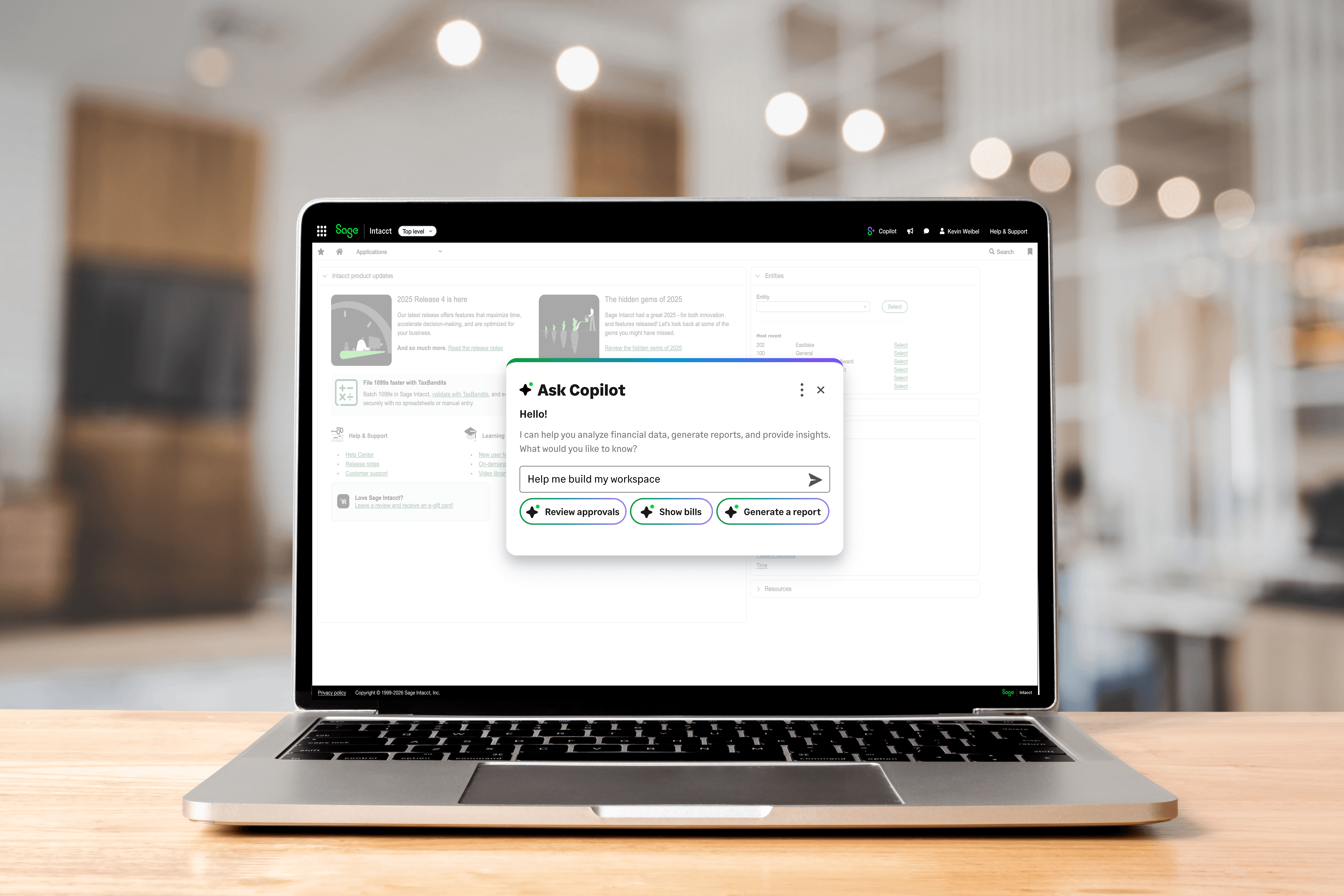
Adaptive UX in action. A Controller preparing for close asks Copilot, "Show me how AP aging changed this quarter." Instead of building a report, they get a chart with the right data and can add it to their workspace. [Confirm the wording of this example.]
Three principles, grounded in Nielsen Norman Group's usability heuristics:
I used Figma, Figma Make and ChatGPT to explore scenarios quickly, then turned the strongest ideas into prototypes stakeholders could experience directly.

Getting leadership to invest
Building on AI already in progress. I was already leading design for AP intelligence, working with Engineering and the AI team as they built anomaly detection for AP automation. I knew what the model could reliably catch [duplicate bills, PO and invoice variances] and how confident it was. I carried that work into the workspace, so its proactive insights rested on capabilities already being built, not on promises.
From insight to action. I presented the concept to Product Managers and Design Directors, and it gained traction. To scale the work, I brought in a Senior Product Designer I was mentoring and split it between us. I designed the set-up workspace and tied each part to use cases from the Product Management Director. She worked with the PM on first-time setup, where a new user shapes the workspace around what they need, and designed the experience of turning workspace metrics into a presentation. Working with the Product Management Director, I designed the end-to-end approval flows that connect intelligence to action: One anomaly, from detection to automation:
Detect. Emma, an AP Manager [confirm], sees an insight in her workspace: an Office Depot invoice for $15 is far outside the vendor's normal range.
Explain. Copilot shows why it was flagged (96% lower than the vendor's average) and offers three choices: review, escalate, or dismiss.
Escalate. Emma escalates. Connie, the Controller [confirm], gets a text with the reason and the bill attached. It turns out to be a late fee.
Approve. Connie replies "Yes," and the bill is approved without opening a laptop.
Automate. So small, expected anomalies don't need her next time, Connie asks Copilot to have Joel, the admin, create a rule. Joel describes it in plain language ("AP Clerks can approve Office-Refurbishment invoices under $80 even if an anomaly is detected"), Copilot drafts the rule, and Joel reviews it before saving.
Every step keeps a person in control: AI flags and drafts, and people decide.
Pressure-testing before executives. This was a concept design meant to win executive buy-in, so I reviewed it with our VP of Design first. They pushed back that parts of the experience were missing, and I filled those gaps before the executive presentation.
Why a video. I chose a video over a deck because executives needed to see the vision, not review screens. It followed Connie, the Controller, because she had the most work a dashboard never fit. It explained why she needed a different workspace and showed the interactions without interruption. The Product Management Director used it to present to executive leadership and secure support to continue.
Facilitating alignment. With our Design Director and a Senior Product Designer, I designed the brainstorming boards and ran a 2-day workshop with Product Managers, Researchers and Designers. Breakout groups worked through real finance scenarios (aggregated totals, filtered lists, cross-object insights, and proactive risk alerts). We dot-voted on what the experience had to get right: predictable, trustworthy with a visible source, simple through progressive disclosure, and actionable. The top-voted ideas were proactive: catching transactions reversed too quickly, and pricing discrepancies before payment.
What research showed. The UX research team evaluated workspace concepts built on this direction in two rounds of 10 sessions with Intacct customers: Controllers, AP Managers, and finance leaders up to CFO. 9 of 10 said the workspace would be useful, because it pulls fragmented work into one actionable view. 8 of 10 found anomaly detection useful. One participant called it "an absolute need." The highest value came from what surfaced time-sensitive information and let people act directly. But traditional dashboards still have a role for metrics people intentionally monitor, and chat isn't the right interface for everything: only 2 of 10 saw added value in configuring the workspace through chat, while 6 of 10 preferred to start in the workspace and move into familiar product screens for detail.
Participants also asked the question this work had to answer: "How is this much different than a dashboard?" That clarified the role of each experience:
Experience | Role | What the user is asking for |
|---|---|---|
Dashboard | Monitor | Show me the information I care about. |
Intelligent Workspace | Prioritize | Show me the information I care about. |
Copilot | Assist | Help me ask, create, configure, or simplify something when conversation is easier. |
Product UI | Investigate + Act | Give me the detail and control I need to complete complex financial work. |
Adaptive UX isn't about replacing familiar interfaces with AI. It's about understanding what someone is trying to do and giving them the right experience for that moment.
Outcome. What started as a question no one had scoped became an executive-backed product direction. Leadership chose to keep investing, and the team is continuing to build it after my contract ended.
How I'd measure success: days to close, open AP items at close, exceptions caught before payment, and time from bill received to approved.
Use case framework

Prioritization board from workshop